Wednesday, April 23, 2014

QRazy about TeacherTube

For awhile I've been wanting to share links to recordings/videos of my students reading their writing with QR codes, but last year the school iBoss filter was blocking the ones I posted to YouTube. It was so frustrating, because I really wanted all the students (not just mine) to be able to access these videos easily. I tried Viemo... BLOCKED. I tried SchoolTube... it's a pain to sign up! Finally I found TeacherTube, and I love it. Sign up is simple and easy. The upload process is insanely fast, and  the best part of all... it creates the QR code for you! All you have to do is cut and paste them.

Here is how we created our video/recordings (we used the FaceTalker app).


 First I took a picture of them holding up their writing while covering their faces (for safety). Then I removed the mouth from the picture (the mouth is designed to move, so I just remove it). Next they record their reading and I attach it to the picture. Once we get a good recording I e-mail it to myself, save it to my computer, and upload. Once it's uploaded  I cut and paste the QR code, print it, and attach it to their final copy before I display it in the hallway!

The kids love it, and everyone else thinks it's pretty cool too! We hope you enjoy them! There aren't very many because most of them were writing in pairs.

Here is a link to my TeacherTube channel where you can check out all their awesome writing!

http://www.teachertube.com/view_classroom.php?user=aclink
In the hallway...

The finished product!

Enjoy!!

Friday, April 18, 2014

Creating Fluid Learners: Mixing Technology and Tradition

I have been seeing so much online from both sides of the technology divide about what students "MUST" do. The voices are so loud! Almost deafening at times and they aren't always very nice. Each side fears that that the other wants to take away what they hold most dear, and they both  fling scientific studies, data, and experts at each other, but to what end? I am very much a tech geek (obviously) , and I fly my geek flag high. Whenever I go on vacation I almost need a separate bag to carry all of my devices and their chargers.  


I was raised on a steady diet of nice hefty books, freshly sharpened pencils, and boxes of sixty-four Crayola crayons (with the sharpener in the back), but I also had computers in my school and in my classrooms starting in kindergarten, and a computer at home starting in fourth grade. Granted the floppy discs were bigger than my hand, but I digress. As you can see I grew up moving fluidly between screens and paper. I want that same thing for my students. Quite frankly I believe that students MUST have both if they are going to be successful in life!

If you've been reading this blog for a while you know that we are a 1:1 iPad school.  Many times when people hear that they assume that we've thrown out all of the paper and pencil tradition and panic ensues. "They have to learn to write" naysayers shout in a panic, and my kiddos do. We plan, draft, revise, edit, and illustrate on paper. We take dictation in cute little notebooks, and scribble, scratch, and scrawl with colored pens in our writing center.  


Then we whip out our iPads and type out final copies faster than you can say "oops I ripped my paper while I was erasing". I can sit down with my kiddos and really go deep into editing and revising without the stress of them having to worry about copying it over again. Nothing gets in the way of others enjoying our writing, even when those fine motor skills are still developing.


We also love to read, and we read everywhere…big books, Kindle books, mini books, chapter books, poems on paper, poems on the screen, poems on charts, Myon books, Razkids books, books to color, and books you hold. Every one helps us to become better readers each and every day.


In math manipulatives hang out alongside fact practice apps, and worksheets in Notability, and we practice that pencil grip with our styluses.  We buddy up to roll virtual dice, play games with real cards, and color by number! 


We get the best of both worlds, and everybody wins. Particularly my students! They will grow up being able to access information anywhere they choose, and they will be able to slide fluidly between technology and tradition. They won't have to choose!

Monday, April 7, 2014

Ga ga for Google Docs... and drive

Okay, I'll admit it! I was not always a fan of Google docs! At first I thought it was Word without the bells and whistles (it sort of is) but now I know that it's so much more... where to begin??? First off I have said goodbye to all my external drives, which I am very good at loosing, or leaving at home, or leaving at school. I do everything on in Google docs now. That way all my stuff is everywhere! I really do mean everywhere... school notebook, personal notebook, phone, and of course the iPad! No more of those ugg I left it at school or shoot  that worksheet is on my laptop at home type moments.Everything from lesson plans to links for the kiddos it's all there!

I love it for me, but I love it even more for the kiddos.  They LOVE to publish their final copies in Google docs. Yes they have to learn to actually write, and we do actually write during every other step in the writing process. For publishing I prefer to use Google drive, and here are the top five reasons...

1. Publishing is no longer like pulling teeth
2. If they make a mistake that is appropriate to fix we can fix it fast and easy without starting over
3. They can see their own errors easily
4. Everyone can read it
5.Typing is an essential life skill

Here they are hard at work
 Using our rough drafts to create our final copies


Notice she is using both hands! Most of them type faster than they write! They are so good at this that they should do PD for teachers on how to navigate Google drive/Google docs! Not kidding!
They were so excited to finish up, and pick their favorite font for me to use when I printed them! Some of them completed three pieces! Normally one is like pulling teeth.

Printing is super easy too. They each have a  folder in their Google drive with their name on it. I own the folder, but it's shared with them so they can open it up and start typing. They never have to send it to me or share it with me because it appears in MY drive in real time!

We even hit those fine motor skills by illustrating


So proud of their finished products!

I can even cut and paste some of my favorites here in seconds!

This one had  a great hook!  

It was me against the dog.First I was playing with the dogs bol.Then the dog bit me.I was ciring! I told my mommy.She Said I will be okay.Then I was happy.I left the dog alone.I have a scor.I have a scor  to remember when I got bit. By Miss. H
Lots of great details in this one!
Me and my mom and my hamster were at home.My mom was gonna feed my hamster Buttercup.My hamster Buttercup was dead.He stoped breathing.I was crying. I threw my hamster Buttercup away.I was exploding teaers. will not forget my hamster Buttercup.
By Miss D
Finally the best closure EVER! 
Ahhhhhhhh! Kiyin was kaching me.We were on the blak top.I triptych on the blak top.I scrat my ne.My mommy hapt my fil betr. It became a skab and skin.
BY Mr.K
I can share them fast and easy with anyone who wants it! Parents, teammates, bloggy friends, or even district iPad goddesses! Plus reading them just makes me smile!  Love my kiddos, love my Google docs!


The Best iPad Management Hack Ever!!!

Lately I have been hearing a lot of questions about how to monitor iPad use in the classroom. People have mentioned various programs that could work, but I don't have the time, bandwidth, or money to buy them. Guided access is great if your kiddos aren't techie (mine can get out of it without knowing the code, and they're only in first grade). It also takes a lot of time to get kiddos off and on because we use at least eight to ten apps/programs/websites every day.

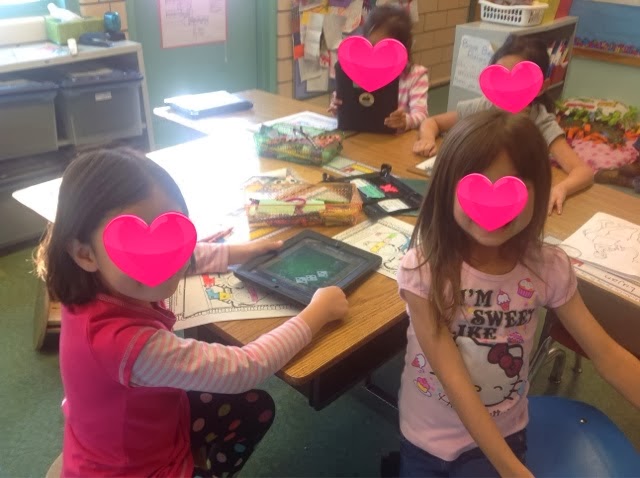
Even I had problems with keeping everybody where they should be, and then a simple solution popped into my mind! It was a face palm sort of moment. Are you ready for it??? Have them sit on the opposite side of their desks (it won't work for everyone because of their classroom set up) it works wonders for us!! Now we call the back side the iPad side and the other side the writing side. When they sit on the iPad side I can see what is on ALL their screens from my small group table!


I have not had even one kid stray out of where they should be since we started doing this! The kids would say "easy peasy lemon squeezy"!

Friday, February 28, 2014

Making Friends With Myon

Sorry, I'm a bad blogger but between my grad school class, after school clubs, and actually teaching first grade I've been a little busy!

Just before Christmas our district purchased a program called Myon for us to use on our iPads, and I was
NOT a fan. I already have Raz-Kids, and the way Myon was presented it just seemed like a less user friendly version of Raz-Kids so I didn't really bother getting to know it (it's not very user friendly or intuitive). However I don't like to be beaten by technology so awhile ago I decided that I needed to conquer the Myon monster and make it my own. Here is what I discovered... as an independent reading tool it doesn't even come close to being as good as Raz- Kids because you have very little control over what kids can and can't read. You also can't assign entire levels of books  a student (sigh)! With that in mind I don't use it at all like it was presented. I use it mainly for three things...

1. Social studies and science- There are so many great books that coincide with our social studies and science curriculum that is amazing. We use them during class,and it almost makes social studies and science like an extra shared reading lesson! Then the kids can download the same books to read or listen to later.


Here we are reading a book about the American flag.
Then they downloaded the book and listened to it, and a few others about the same topic while they worked on an American flag hundreds chart during math!


2. Guided reading- I've also started using Myon during guided reading. It took forever to get a lot of books leveled for use with DRA2  (I'm still working on it) but it's great because my class had a real gift for losing guided books!!! They never loose these, and there are always enough copies!


3. Shared reading- I can project the books with Air Server, or Splashtop, and the kids can all have their own copy for read to self or listen to reading... enough said!


Disclaimer- My bunch is NOT allowed to download any book they want! They can have one "just for fun" book of their choice. The rest of the books they download have to be ones that I picked for shared, guided, or content. If I find other books I delete them! If they picked their own they would ALL be listening books...NOT reading books!

Friday, January 10, 2014

Mixing it up in Math

Thought for today... necessity is the mother of invention  finding very odd and specific apps. Every Friday we mix it up a little during math when our amigos from the dual immersion class come and join us for math games. This week I found a really fun, and engaging math game at Teacher's Pay Teachers  Color By Sum: Winter Version


To play this game each pair of students needs three dice, but I have a love hate relationship with dice because they... are loud, can be thrown at other people, roll away and need to be chased, tend to end up at the bottom of a tub or drawer where I can never find them when I need them, and throwing dice is a little boring! I also don't have enough for 19+10= 29 kiddos to use at once. So I decided to hunt up an app for rolling dice, and I found a great one Dice Roll Free! We just love it, because you can roll from 1-6 dice at a time, it doesn't add the dice up for you, AND you have to shake the iPad to roll the dice! It's simple, fun, and just right for us!


First you shake,shake,shake the iPad (the kids loved this part)!


(Just a side note... these two picked each other as partners. She speaks mostly Russian, he speaks mostly Spanish. LOVE it)


                                                                                      Then, you add up all three dice.

 Next you color in the section on your paper with the answer in it (if you have it).


Whoever colors in all their sections first wins.

They could have played this game for hours. I doubt we'll ever use regular dice again! They were so much more engaged then they normally are with dice games!


Wednesday, January 8, 2014

New year... New iPad Magic

Hello boggy friends :) I've decided to write shorter more frequent posts. These long weekly ones are going to drive me crazy. Here we go...

Today was our first day back and the kiddos were so excited to have our little family back together. All the iPads came back in one piece(kudos to my kiddos and parents for taking such good care of them). Their little minds were ready for something new so we jumped right in to Schoology. Let me say that I LOVE SCHOOLOGY, and so do my kiddos. I had to force them to go to lunch and recess because they just wanted to stay and post in Schoology some more.

It took us awhile to get the app downloaded and everyone logged in because it's a new log in combo, but I showed a couple people how, and before long everybody was logged in. 

 All logged in and ready to go


Pipgeek in action


My right hand girl  "Miss. H" showed our new friend (first day with her iPad)  how to download apps. She also got her all set up and logged into Schoology.  What would I do without my Pipgeeks???

Earlier this week I set up a group for us in Schoology and added all my kiddos. Then I posted a  fun question on the main page for them to answer, and a  reader's response question on our discussion board.The question was "Who do you like better, Jack or Annie? Tell why! (We have a slight obsession going with the Magic Tree House books)

They jumped right in to posting, and simply fell in love with it. I have never, never seen them this excited about ANY  kind of writing! 


Here is a screen shot of some of their comments... remember this was their FIRST experience with this program. None of them had ever seen it before!


Their writing here has such voice and expression. I was impressed! It's just a few words each, their spelling and punctuation are't perfect, but I can tell you this... it sounds just like them. They were less than happy when it was time to go to lunch, but luckily our awesome teacher librarian, (former blog name "Mr T") Mr. Chop chop (don't even ask) joined our group, and posted a new question for them, to answer later in the day!

Click here to learn more about Schoology: https://www.schoology.com/page/15668739

For right now we will mostly be using this for reader's response, and math writing, but that is only the beginning of what we will do with it! Stay tuned to folks, thanks for joining us on our journey!

P.S. Please don't tell the kiddos that they were writing today ;) they think it's just fun, not actual school work, and I want to keep it that!